Parent-managed schedules
Choose when school mode or focused device time should be active.
 ClearGuard
ClearGuard for families
Build healthier device habits with straightforward controls for apps, schedules, and web access. Set up quickly, manage everything from one parent portal, and cancel anytime.
Home protection
Parents get practical controls without turning everyday family technology into a surveillance system.
Choose when school mode or focused device time should be active.
Set which applications are appropriate during protected time on supported Windows devices.
Use the ClearGuard browser extension to apply visible website rules and block unsafe or distracting destinations.
We never sell your personal data or use it for advertising. ClearGuard stores only the account and device information needed to provide the service—without screenshots, keystrokes, or private-message contents.
Read our Privacy Policy →Device compatibility
ClearGuard Home is currently designed for Windows desktops and laptops, plus Chromebooks.
Supported through the ClearGuard Windows app and compatible browser extensions.
Supported through the ClearGuard browser extension for website protection and family rules.
Mac is not supported at this time. We want families to know this before starting a trial.
Manage your children’s schedules, Focus now, website rules, and connected PCs from your phone. Sign in to your ClearGuard Parent portal, then add it to your Home Screen for quick access.
Using Samsung Internet? Open your Parent portal, tap the browser menu, then look for Add page to → Home screen.
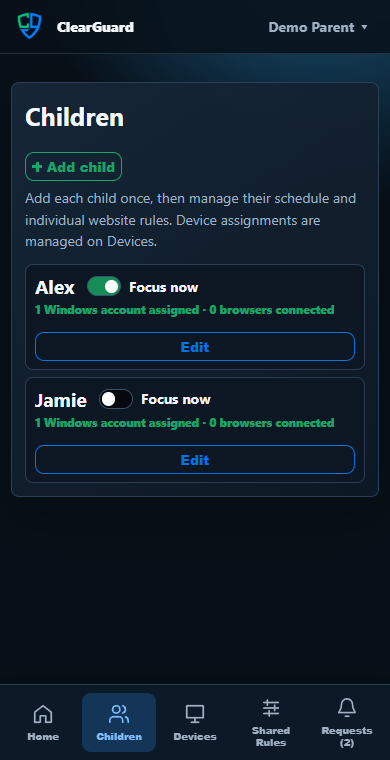
Manage each child and switch focus on or off.
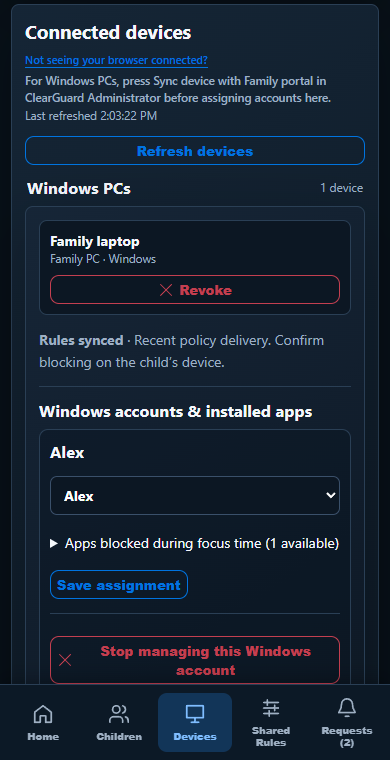
Assign Windows accounts and choose apps to block.
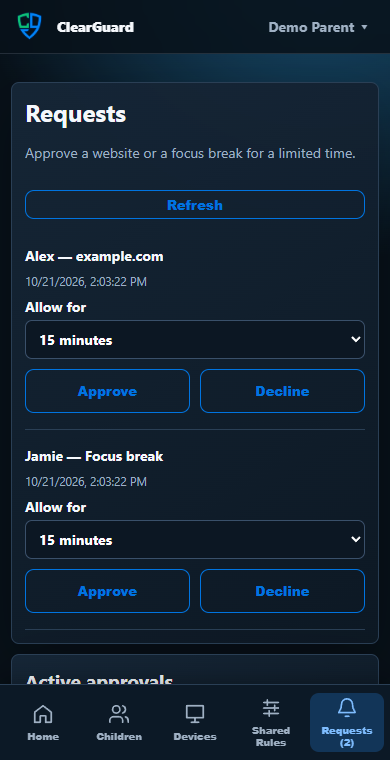
Approve website access and focus breaks from your phone.
Your phone is your remote control for the Family portal. Protection runs on the supported computers and browsers you connect.
Three simple steps
ClearGuard guides you through the essentials without a complicated installation process.
Start your trial and use the secure welcome email to create your private family portal.
Create a child profile and choose its weekly focus schedule. Shared Website Rules are optional.
Assign each child to their standard Windows account. Supported browsers and app inventory then follow the child who is signed in automatically.
Choose your plan
Your trial includes every feature in the plan you select. Cancel before the trial ends and you will not be charged.
ClearGuard Home
$5.99/month or $49.99/year
ClearGuard Home Plus
$8.99/month or $79.99/year
A Windows account and a browser connection each count as one connection toward your plan’s limit.